Introducing Retrofit UI
Retrofit UI is a server-driven UI framework aimed at developers. The idea: a backend developer should be able to expose an admin interface for their service by adding a few endpoints — no frontend code required, unless you really want to opt into the complexity. Point the app at those endpoints and it renders forms, tables, and navigation from the data the backend describes.
The itch is the same one that started server-driven MUI: admin UIs at my day job are a specific kind of annoying. Any change to a backend service’s data model means a matching change in a separate frontend repo, just to keep some CRUD screen in sync — a screen nobody spends real design effort on to begin with. The amount of tedium never matched the value delivered. Server-driven UI seemed like the actual fix: let the backend that already owns the data model also own what gets shown for it, instead of a frontend team re-deriving that shape by hand every time it changes.
This is a rebuild of an earlier experiment called server-driven MUI. That version got the idea working but was rough — Python backend, no tests, manually constructed JSON component trees. All it did was send a JSON representation of high level react component and leave it to the front end to build the rest of the component tree
I came back to it in late December 2025 and started over with a clearer design:
- a spec to represent components — one that is easy to extend and utilize
- a front end implementation of that spec (I used SolidJS and shoelace components just for learning)
- two implementations of providers of the spec, backends for app developers to use:
- a static renderer which I used in the documentation page
- a spring-boot server library which can be used by java servers to declare data
How it works
The core of it: the backend derives a UI spec from its own data schema and serves it alongside the data. The frontend reads the spec and renders accordingly — no hardcoded component knowledge on the backend, no custom JSON format to invent.
Here’s what a table view endpoint looks like:
import { zodToJsonSchema } from "zod-to-json-schema";

const jsonSchema = zodToJsonSchema(BookSchema);
const updateSchema = zodToJsonSchema(UpdateBookSchema);

const view = TableView.fromSchema(jsonSchema, "Books")
  .forUpdateCommand(updateSchema)
  .editUrlTemplate("/sdmui/book/{$.isbn}")
  .buildForPage(page); // page of rows of data

return res.json(view);
The frontend receives a TableViewSpec (or FormViewSpec) and a page of data,
and renders accordingly. No component name strings, no manual JSON construction.
The forUpdateCommand pattern
Editability is controlled by passing a separate schema for what can be updated. Fields present in the full schema but absent from the update schema render as read-only — no per-field annotations needed, the constraint comes from the type system.
// Full schema has `isbn`, `name`, `author`, `year`, `purchaseLink`
// Update schema only has `name`, `year`, `purchaseLink`
// → isbn and author render as read-only automatically
FormView.fromSchema(fullSchema, "Book")
  .forUpdateCommand(updateSchema)
  .buildForEntity(book);
How it’s different from the original
The original worked by having the backend manually construct a JSON tree of component names and props:
[{ "component": "NiceTable", "props": { ... }, "children": [...] }]The frontend walked that tree and called createElement on each node, mapping
component name strings to actual React components. It was clever but brittle —
adding a component meant updating the map, and the JSON had no validation.
The new version inverts this. Instead of describing components, the backend describes data. The frontend figures out how to render it.
Three other differences worth noting:
TypeScript all the way down. The original needed a Python backend to
generate the JSON. The new version is pure TypeScript/Express — everything runs
with one pnpm invocation.
Test infrastructure from day one. The original had no tests. Retrofit UI starts with Playwright E2E tests that spin up a test server and exercise the rendered UI. Each prototype has a spec document listing test scenarios before any implementation.
JSON Schema as the contract. Rather than a bespoke component language, the backend derives the UI spec from its existing Zod types. The schema is already there; Retrofit UI just uses it.
[{ "component": "NiceTable", "props": { ... }, "children": [...] }]The frontend then walked that tree and called createElement on each node, with
a lookup table mapping component name strings to actual React components. It was
clever but brittle — adding a new component meant updating the map, and the JSON
structure had no validation.
The new version inverts this. Instead of describing components, the backend describes data. The frontend figures out how to render it.
JSON Schema as the contract
The key insight is that the backend already has a schema for its data — usually as a Zod or TypeScript type. Rather than inventing a component language, you derive the UI spec from that schema:
import { zodToJsonSchema } from "zod-to-json-schema";

const jsonSchema = zodToJsonSchema(BookSchema);
const updateSchema = zodToJsonSchema(UpdateBookSchema);

const view = TableView.fromSchema(jsonSchema, "Books")
  .forUpdateCommand(updateSchema)
  .editUrlTemplate("/sdmui/book/{$.isbn}")
  .buildForPage(page); // page of rows of data

return res.json(view);
The frontend receives a TableViewSpec (or FormViewSpec) and a page of data,
and renders accordingly. No component name strings, no manual JSON construction.
The forUpdateCommand pattern
One thing I liked a lot: editability is controlled by passing a separate schema for what can be updated. Fields present in the full schema but absent from the update schema render as read-only. You never annotate individual fields; the constraint comes naturally from the type system.
// Full schema has `isbn`, `name`, `author`, `year`, `purchaseLink`
// Update schema only has `name`, `year`, `purchaseLink`
// → isbn and author render as read-only automatically
FormView.fromSchema(fullSchema, "Book")
  .forUpdateCommand(updateSchema)
  .buildForEntity(book);
TypeScript all the way down
The original had a Python backend to generate the JSON. The new version drops
that — both the test servers and the framework are pure TypeScript/Express. The
Python layer added friction and made the project harder to run locally. Removing
it meant everything was one pnpm invocation.
Test infrastructure from day one
The original had no tests. The new version starts with Playwright E2E tests that spin up a test server and exercise the actual rendered UI. Each prototype has a spec document that lists the exact test scenarios before implementation starts.
The build
I started fresh on December 28, spending the first day on scaffolding: GitHub Actions CI, Playwright config, the routing skeleton, and the docs directory with prototype specs. No application code.
Prototype 1 (single entity form view) started December 29. The commits across
that stretch are the honest record of iterative work:
First attempt at prototype-1, Have stuff,
Most of the first prototype is done woo, then immediately back into
Partial changes, Partial update, Reversions. Delete operations for arrays
were messy enough to warrant their own commit message:
Delete array kinda works now. Finally got it all working for proto1 landed
January 8.
Table view (prototype 2) came together faster — Table view works on January
11, just three days after the form view landed. The pattern was established;
applying it to a new view type was mostly mechanical.
The latest commit is called What did i even do. That’s where things stand —
something exploratory is in progress and I haven’t decided if it’s worth
keeping.
Using an agentic SDLC for development
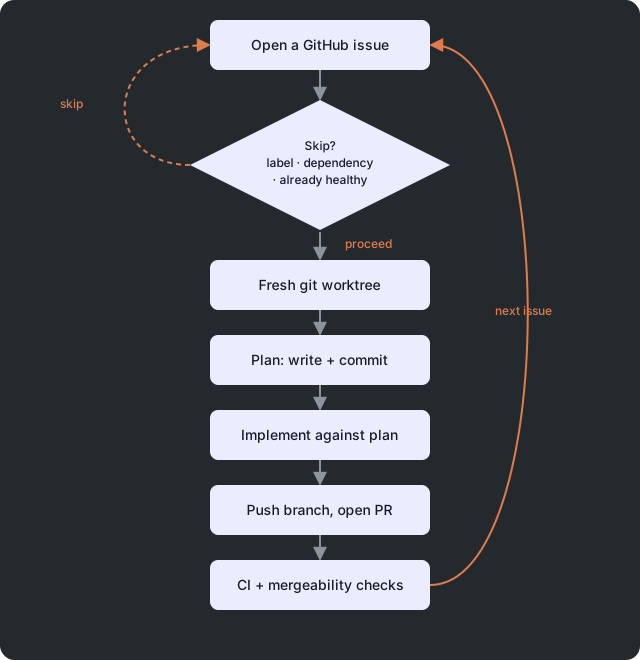
This was the first project where I used a small script to drive software
generation autonomously, with GitHub itself as the intermediary that tracks
the work: scripts/implement-issues.sh picks up open issues and works
through them one at a time — a first pass to write and commit a plan, a
second to implement against it, then a normal PR lifecycle: push, open or
update the PR, check CI and mergeability, and move to the next issue. Issues
can declare dependencies on each other in plain text (“Depends on #42”), and
the harness skips anything still blocked or already healthy, so re-running
it is safe rather than something that needs careful babysitting.
The reason a spec-driven project makes this tractable: the harness doesn’t
need to understand the whole codebase to act correctly, it needs the same
thing a TableView builder needs — a declared contract (the issue, the
plan, the PR’s CI status) it can reconcile against, one step at a time. The
same idea that shows up in the framework’s own design — declare a spec, let
something else reconcile it — turns out to apply recursively to how the
framework gets built.
Key Learnings
Ship fully-formatted data with the spec, not just the shape
A table cell carries both the raw value and a pre-computed display string —
{ value: 1234.56, formatted: "$1,234.56" } — rather than shipping raw
values and leaving the frontend to apply Intl formatting itself. It sounds
like a small thing, but it means locale/currency/date formatting lives in one
place (the server) instead of being re-implemented per renderer, and a
Python or Java backend gets output identical to a TypeScript one without
agreeing on a shared formatting library. The renderer’s job shrinks to
“print cell.formatted if present, else String(cell.value)” — no
formatting logic of its own, and no renderer lock-in to something like a
web-component’s built-in number formatter.
Concretely, one response for a table of expenses looks like this — and the renderer never touches a locale or currency symbol:
{
  "columns": ["Vendor", "Amount", "Date"],
  "data": [
    {
      "vendor": { "value": "Acme Corp" },
      "amount": { "value": 1234.56, "formatted": "$1,234.56" },
      "date": { "value": "2026-06-14T12:00:00Z", "formatted": "Jun 14, 2026" }
    }
  ]
}| Vendor | Amount | Date |
|---|---|---|
| Acme Corp | $1,234.56 | Jun 14, 2026 |
The renderer reads that table top to bottom and prints formatted where
it’s present. A Python or Go backend emitting the same shape gets the exact
same rendered table — no shared Intl library, no client-side locale logic
to keep in sync across languages.
Dogfooding surfaced real design gaps that spec-writing alone didn’t
Building the docs page, a demo app called chalk-app, and eventually the
project’s own landing page — all rendered by Retrofit UI’s own spec system
— forced decisions that stayed theoretical otherwise. The landing page push
added composable flex/grid layout containers (so a page can be built
from nested layout primitives instead of one flat list of views) and a
proper nav shell — a hand-rolled sidebar first, then rebuilt on Shoelace’s
sl-drawer, which handles the backdrop, focus trap, and Escape-to-close for
free and dropped about 40 lines of custom CSS. Every SPA now gets a default
“Home” nav item without a server needing to declare anything — opting out is
the explicit path, not opting in. None of that was in the original design;
it only showed up because the framework had to render something real.
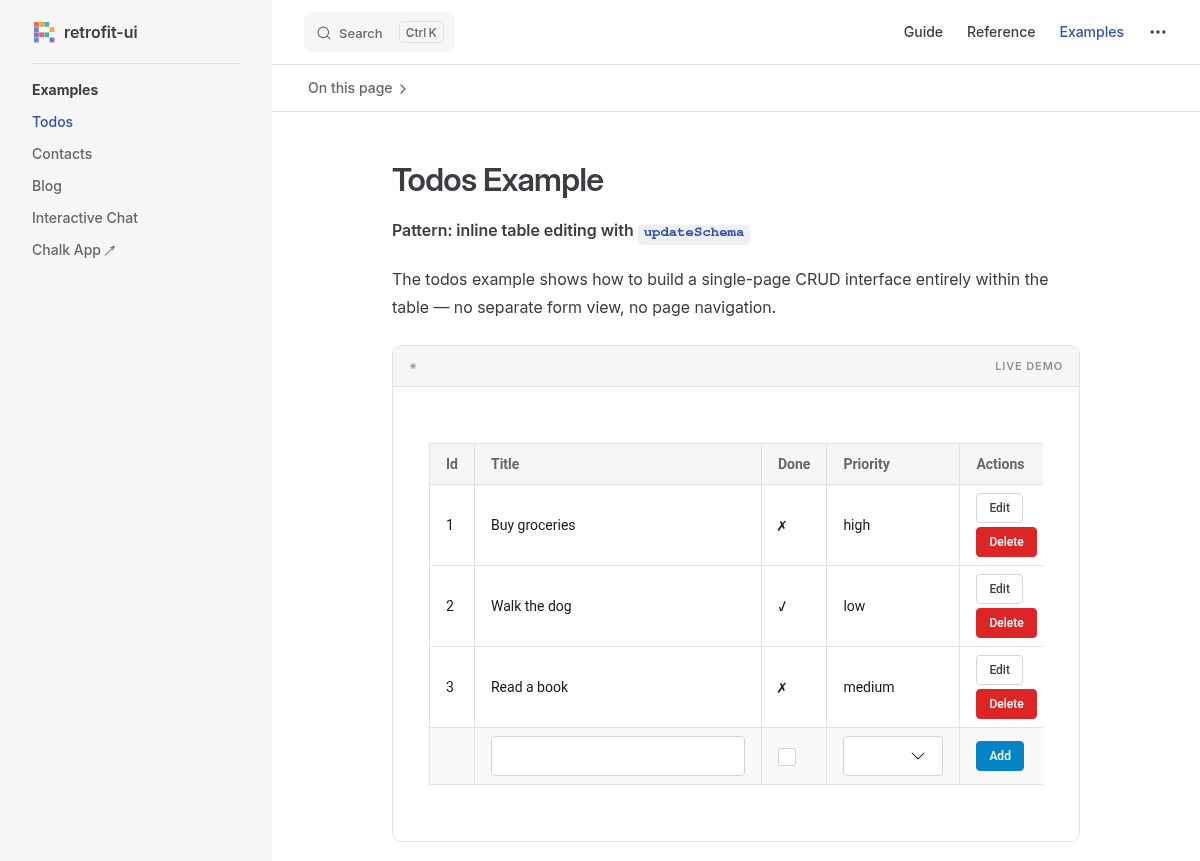
That’s not a screenshot of a mockup — it’s @retrofit-ui/spa-solid-shoelace
actually mounted on the docs site, rendering a TableSpec against data
mocked in-browser with MSW, the same renderer path a consumer’s admin table
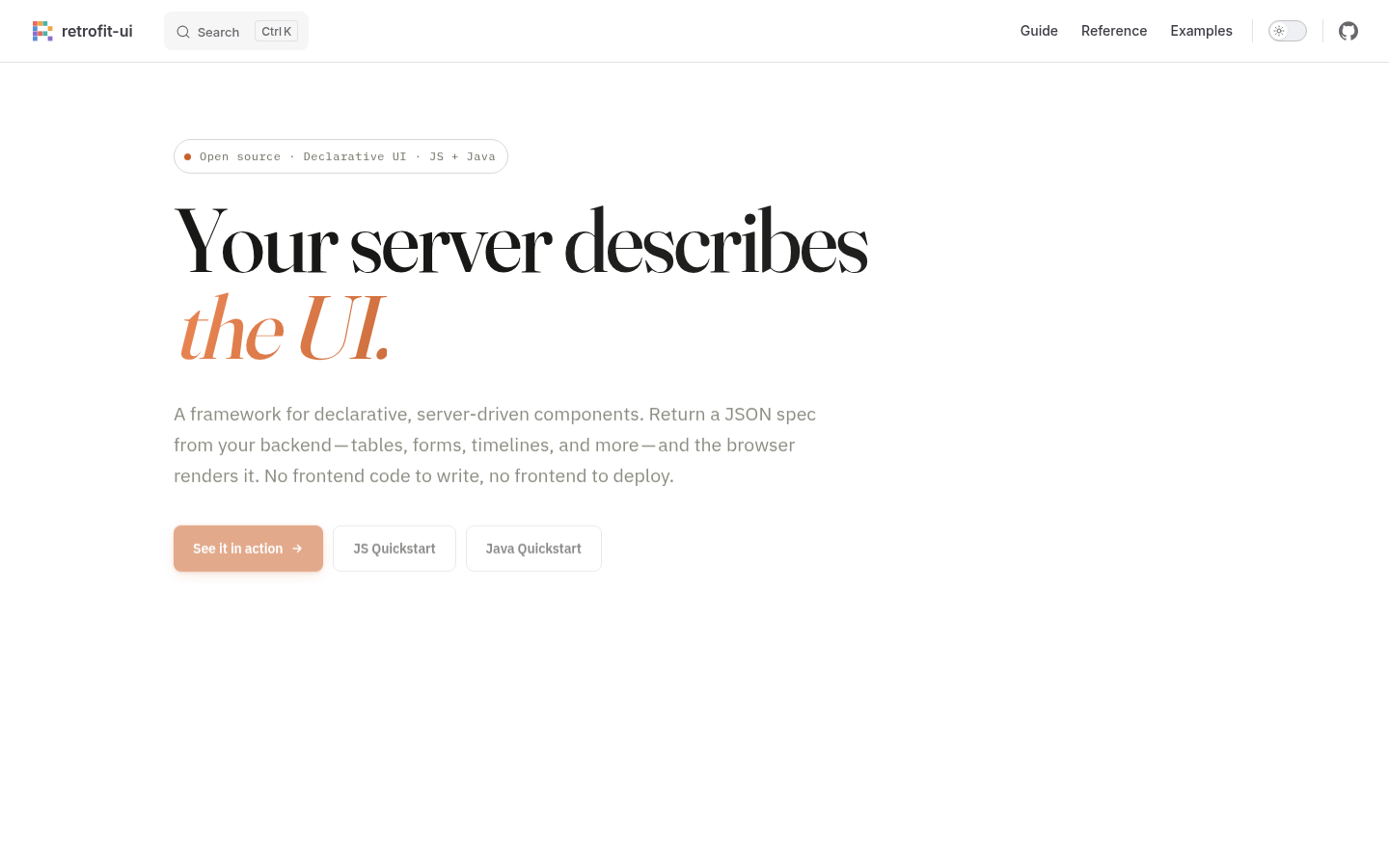
would use. The docs site’s landing page (this post’s hero image) is built
the same way — a PageSpec served like any other Retrofit UI response. If
the framework couldn’t handle its own docs and marketing pages cleanly,
that would have been a real signal.
AI harnesses can be built easily with spec-driven development
Experimenting with retrofit UI to create a chat harness to learn math was easy to do since it was driven by a spec that was minimal. Stay tuned for another blog post on this topic!
What’s next
The roadmap calls out two more things worth doing: better handling of nested
objects in forms, and a way to define navigation between views (so clicking a
row in a table can load the form view for that row without hardcoding the URL
pattern on the backend). The editUrlTemplate is a start but it’s a string
template, not typed.
Building several example apps side by side surfaced a real drift problem,
too: each example had two hand-maintained copies of its spec — an Express
server building it with the fluent builder API, and a separate docs demo
constructing the same shape as a plain object literal. They drifted silently;
one docs demo broke when a spec shape changed in core but its hand-copied
version didn’t get updated. The fix was extracting the actual spec-building
code into a shared module each side imports — the server thins to just
Express wiring, the docs demo calls the same builder. Any future spec-shape
change now breaks the docs build at compile time instead of failing silently
at runtime, and about 360 lines of duplicated spec construction disappeared.
The original question — whether a developer can build a working admin UI by writing only backend code — has a cleaner answer now: yes, for the cases the prototypes cover. The gap is still the long tail of UI patterns that don’t fit form-or-table.